Edit text right on the page
Click, type, and format words with bold, italic, highlight or a link.
1 min read · updated 1 October 2026
You can change almost every text by clicking it on the page and typing. The same text also appears in the panel on the right, so you have two ways to edit, and they stay in sync.
Formatting
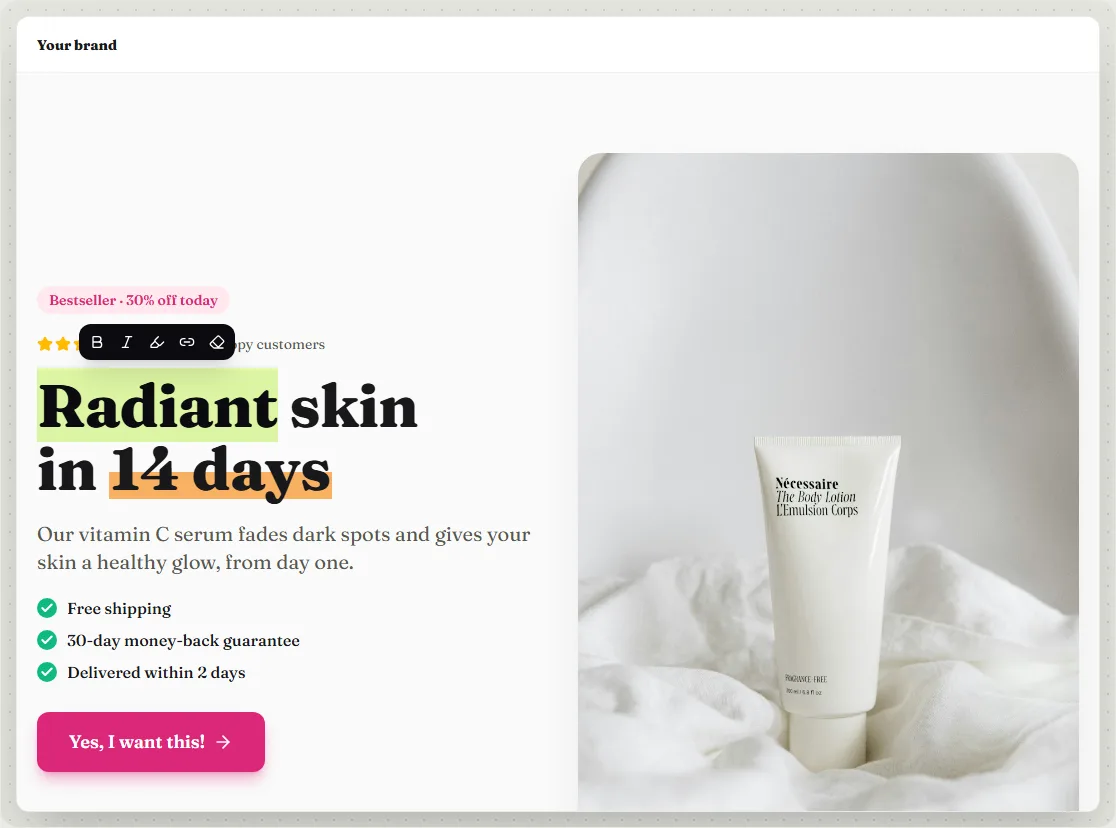
Select one or more words and a small bar appears above them:
- Bold and italic
- Highlight in your brand colour, great for the key words of a headline
- Link to another page or a section
- Clear formatting
Line breaks and paragraphs
In headlines and short texts, Enter finishes editing. In longer texts, Enter starts a new paragraph. Pasted text is cleaned up automatically, so no strange fonts come along.
Buttons and links
Clicking a button's text lets you edit the label. Where the button goes (next step, a specific step, a URL or a section of the page) is set on the right, under Content.
**bold**, *italic*, ==highlight== and [text](https://…). You rarely need it, but it's handy for quick edits.Was this guide helpful?
Try it in your own store
Free for 14 days. Every feature, no credit card.