A/B test a page
Show two versions, measure which sells more, keep the winner.
1 min read · updated 1 October 2026
An A/B test shows two versions of the same step to different visitors and counts which one converts better.
Start a test
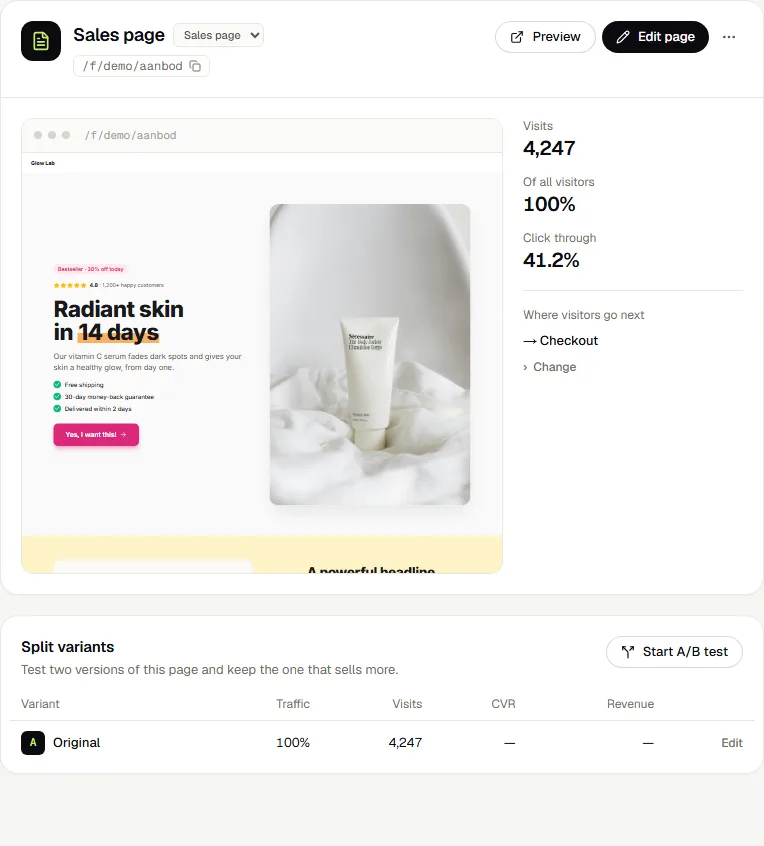
On the funnel page, select a step and press Start A/B test under Split variants. Version B starts as a copy of A and opens in the editor. Change what you want to test, like the headline, the image or the offer, and save.
You can also let AI write a different version B for you in the editor, under Step → A/B test.
Traffic split
By default half of the visitors see B. Change the split with the slider under Step → A/B test. Each visitor keeps seeing the same version.
Read the results
The Split variants table on the funnel page shows traffic, visits, conversion rate and revenue for A and B. The version that converts better is marked as leading.
Pick the winner
Press Keep A or Keep B. The test ends and the winning version becomes the page.
Was this guide helpful?
Try it in your own store
Free for 14 days. Every feature, no credit card.